
Pouch – save a page in one click and come back to it later
A lightweight Firefox add-on that replaces the pile of open tabs and “someday” bookmarks. Click the icon in the address bar or press Alt+Shift+S and the page lands on your list. By default everything stays in your browser, and if you want the same list on several computers, you can sync it through your own server – no account in someone else’s cloud. On an Android phone, the same list is available in the Pouch app.
Interesting pages get lost before you get to read them
An article for later, a guide to check when you have a moment, a recipe for the weekend. Everyone has their own way of not losing them – and every one of those ways fails eventually.
Open tabs are not a list
After a week there are forty of them, the browser slows down, and one accidental window close wipes out everything you were saving for later.
Bookmarks pile up, but nobody goes back to them
The “To read” folder keeps growing for years. It’s hard to skim through, and you can’t tell what is already out of date.
Read-later services can disappear
Pocket, used by millions of people, was shut down in 2025. A list kept in someone else’s cloud lasts only as long as that service does.
Where to find Pouch in your browser
Pouch needs no account and no setup. Right after installation it works in three places in Firefox:
Address bar icon
One click saves the current page together with its title and site icon.
- Keyboard shortcut Alt+Shift+S
- The icon changes when the page is already saved
- A ✓ badge confirms the save, a ! signals an error
List on the toolbar
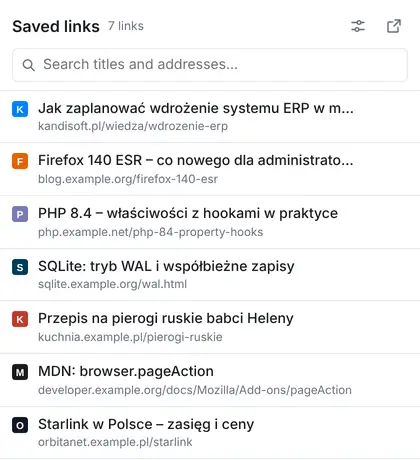
All saved pages in one popup – newest first.
- Search by title and address
- Edit an entry’s title and address
- Delete with undo
- Open in the background with the middle button or Ctrl
Right-click menu
You don’t even have to open a page to save it.
- “Save link to Pouch” on any link
- “Open list in a tab” on the list icon
- The same address never lands on the list twice
How it works
1. You save a page
Click the icon in the address bar or press Alt+Shift+S. Pouch stores the address, title and site icon – without opening any windows.
2. You see what you already have
The icon switches to “saved”, and a ✓ briefly appears on the toolbar. If you save the same page again, Pouch refreshes its title instead of creating a duplicate.
3. You come back when you have time
Open the list from the toolbar and type a few letters. Pouch searches titles and addresses, and opens the clicked link in a new tab.
4. You tidy up the list
Remove pages you’ve read with one click. Made a mistake? For a few seconds you can bring it back with the “Undo” button.
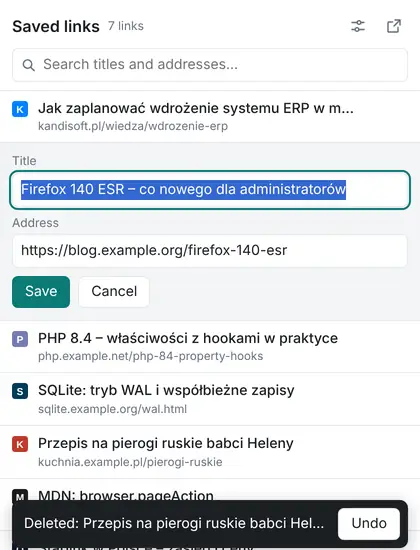
Edit entries – title and address your way
Change the title to something more descriptive or fix the address. Pouch makes sure the same address never appears on the list twice.
List in a separate tab
When the list grows longer, open it in a full browser tab – with the same search and editing, across the whole screen.
Comfortable even with a long list
Pouch is simple, but it doesn’t slow down as your saved pages pile up.
Pagination – the list split into pages
With hundreds of entries, turn on pagination in the options: 10, 20 or 50 items per page. Search still covers the whole list.
Light and dark theme
The list follows your system settings, so it won’t dazzle you with a bright background in the evening.
Light and fast
No frameworks and no external libraries. The list is stored locally, so it opens instantly – even offline.
Sync through your own server – optional
Want the same list at work and at home? Pouch includes a small PHP script that you install on your own hosting. No sign-up and no middlemen – your links go only to the server you choose.
1. Upload the server folder
Any ordinary hosting with PHP 8.0+ and the pdo_sqlite extension will do. The SQLite database creates itself – no MySQL and no installer. You’ll find the server files in the server folder on GitHub.
2. Set a token
In config.php you enter a random token (at least 16 characters). Without the token the server rejects every request.
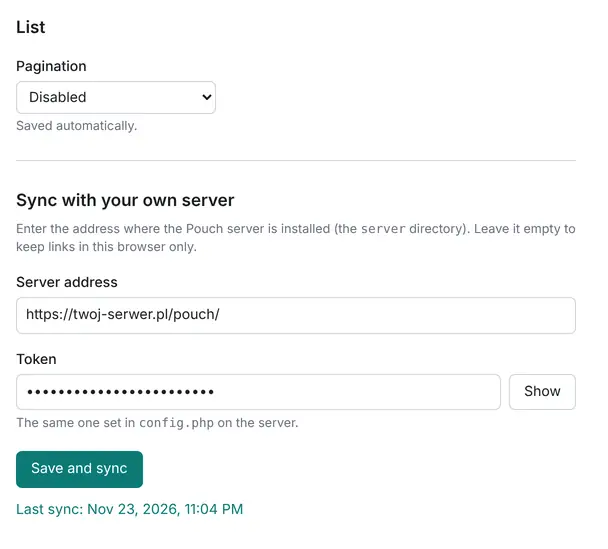
3. Enter the address and token in the options
The “Save and sync” button checks the connection right away and shows the time of the last sync or a description of the error.
4. Pouch syncs on its own
It sends changes a few seconds after a save, edit or deletion. New entries are fetched when the browser starts, when the list is opened and every 15 minutes.
5. Deletions sync too
An entry deleted on one computer disappears on all of them. If you change the same entry in two places, the newer version wins.
6. No duplicates
If you save the same page on two devices, after syncing each of them keeps a single entry.
Pouch for Android – your list always in your pocket
The add-on now has a companion app for Android phones. Save pages straight from your phone’s browser, search and edit the list, and thanks to syncing through the same server you see one shared list on your computer and in your pocket. You’ll find the app and installation instructions on GitHub.
Share → Pouch
Page open on your phone? Tap “Share”, then Pouch – the link goes to the top of the list.
- Works from the browser and any app that shares links
- Pouch extracts the address from the shared text by itself
- The same address never lands on the list twice
List on your phone
All saved pages – including those from your computer – with search and editing, just like in the add-on.
- Search by title and address above the list
- Edit button: change the title and address, open or delete the entry
- A tap opens the page in your default browser
- Swipe sideways to reveal the delete button
- The + button adds a link manually and suggests an address from the clipboard
The same sync
In the app settings you enter the same server address and token as in the add-on options.
- Changes reach the server about 2 seconds after a save or deletion
- Syncs when the app opens and closes
- Pull the list down to sync immediately
- Requires a server with https
Privacy you control
Your data stays in the browser
Without a configured server, the list is stored only in Firefox’s local storage. Nothing goes to the add-on’s author or to third parties.
Zero data collection
Pouch has no analytics, telemetry or ads. In its declaration for Mozilla, the add-on explicitly states that it collects no data.
Minimal permissions
The add-on doesn’t ask for access to the content of the pages you visit. It reads the address and title only of the tab you save yourself.
Your server, your database
The SQLite database file gets a random name that can’t be guessed from outside. You can also move it outside the public directory.
A token with every request
The server responds only to requests with a valid token. The add-on sends no cookies with them.
Warning about http
If you enter a server address without https, the options will warn you that the token and your list of links will be sent unencrypted.
Firefox 140 and newer
The add-on uses Manifest V3 and works in current versions of Firefox, including the ESR 140 release.
Signed by Mozilla
The .xpi package passes Mozilla’s review, so it installs permanently in regular Firefox.
Open source
Pouch is released under the Mozilla Public License 2.0 – you can check every line of code yourself in the GitHub repository.
What Pouch doesn’t do
The add-on doesn’t work in Chrome or Edge
The add-on is built for Firefox 140 or newer. On an Android phone you can save pages from any browser through the Pouch app. There is no iPhone version.
It doesn’t save page content
The list stores the address, title and site icon. If a page disappears from the internet, Pouch won’t show you a copy of it.
No accounts and no author’s cloud
Sync works only with a server you set up yourself. Without it, the list lives in a single browser.
No tags or folders
Pouch is a simple list with search – in the add-on and in the Android app. Both interfaces are in English for now.
From installation to your first save
1. Installation
Download the signed .xpi file from GitHub (Releases) and open it in Firefox – drag it into the window or choose Menu → Add-ons → ⚙ → Install Add-on From File – and confirm.
2. First save
Open any page and click the bookmark icon in the address bar or press Alt+Shift+S. The list icon appears on the toolbar right away.
3. Sync (optional)
Want the list on several devices? Upload the server folder to your hosting and enter the address and token in the add-on options – and in the Android app settings (the ⓘ icon).
Free and open – no accounts, no subscription
Pouch is free and open source (MPL 2.0 license). There’s no limit on saved pages, no ads and no paid version. You install the sync server yourself – on the hosting you already have.
Free, forever
0 PLN
The full add-on with all features and a sync server to install on your own hosting.
- One-click saving and the Alt+Shift+S shortcut
- Search, editing and undoing deletions
- Pagination plus light and dark theme
- Optional sync through your own PHP server
- Android app with the same sync
- No data collection and no ads
- Open source under the MPL 2.0 license
Support and custom development
Individual quote
Help setting up the sync server, new features and faster handling of requests – directly from the add-on’s author.
- Installation and configuration of the sync server
- Custom feature development
- Priority for bug reports and messages
- A version of the add-on tailored to your company’s needs
Support Pouch development
Using Pouch and want it to keep growing? A voluntary donation helps maintain the project, fix bugs and add new features. Every amount counts.
You can support the project via PayPal or Buy Me a Coffee. Prefer a regular bank transfer? Write to us – we’ll reply with the account number.
Want to run Pouch in your company?
Write to us – we’ll help you install the add-on and set up the sync server.


